
Monthly Archives: October 2014

Creating Courseware in Online Classes

This is the week I was worried about! I expected that at some point in this class I would be required to upload some sort of audio into my blog. Though I have read about many potential web 2.0 tools I could be using in my classes and that I recognize as valuable, I always dread the day I have to actually LEARN the technology! How sad is that for an online instructor?

Actually, it’s not that I really mind learning the technology. It’s actually about all of the troubleshooting that I have to go through to make something finally work. It never seems to fail.

I’ve been wanting to at least incorporate audio messages to my students. But I’ve just spent over an hour trying to find out how to record an audio message onto my computer in order to be able to load it into audioBoom, and it still isn’t working. I’m guessing that I either need a new microphone or that what I thought was a microphone isn’t one at all, which means I’ll be making a trip to Best Buy, Radio Shack or some other such store that sells a reliable and very user friendly computer microphone. In the meantime, here is my silent introduction to my class:

https://audioboom.com/search?utf8=%E2%9C%93&q=annemariesaxe

I enjoyed the reading this week, and I attempted to utilize several of the tools Ko and Rossen recommended. In trying to find out how to conduct an advanced Google search, I Google searched “how to conduct an advanced Google search”. I stumbled across a very helpful web page explaining how to conduct advanced and alternative searches in all kinds of websites. I conducted an advanced Google search on “shield volcano”. I was specifically hoping to find an image that was free for use, was written in English and had the term “shield volcano” in the title. The advanced search definitely helped reduce the number of images needing to be screened as the search yielded only two pages of websites, however I was unable to conduct a search for only .jpg formats. I found two great photos as well as a wonderful animation of an erupting shield volcano!

https://www.youtube.com/watch?v=5hE2DZdl0IA
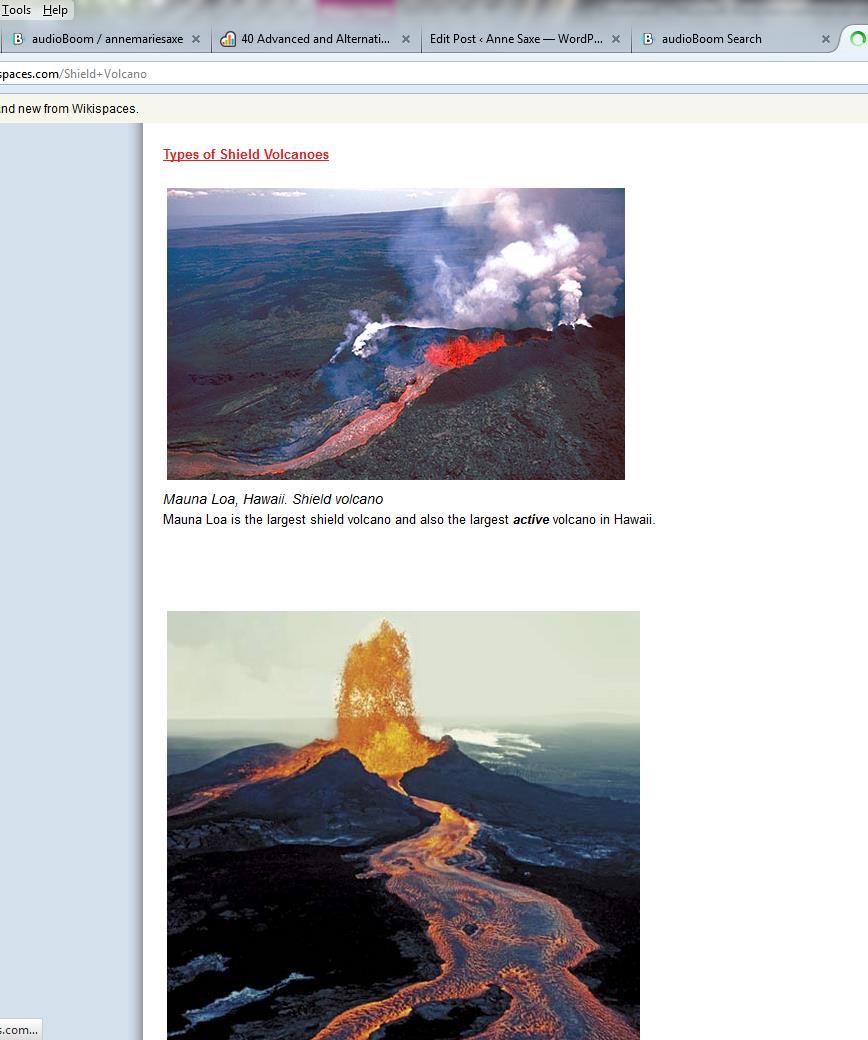
Shield Volcanoes


The Use of Intellectual Property in Online Classes

I must confess, I expected this week’s readings about intellectual property to be boring. I thought we would be examining and talking about a bunch of laws. However, I was pleasantly surprised to discover how thought-provoking and informative this week was! I found myself excitedly discussing the TED talks video about “Laws that Choke Creativity” with my husband last night, and I forced him to watch George Bush and Tony Blair singing “Endless Love” to each other. The video really got me thinking about how the present college-age generation views and builds art and information, and I appreciate the humor in the TED talks video (with the exception of Jesus singing “I Will Survive” as I found that rather offensive) as well as in the 59 ½ minutes segment.

What really sparked my thinking was Lessig’s explanation of the two extreme viewpoints regarding intellectual property: auto take down vs. no respect at all for copyright laws. As online instructors we navigate a rocky road – what information is freely available for use, and what information will steal from the “artists’” market? This question reminded me of a recent example from my online class. Students have previously been able to access practice quizzes and resources online from the publisher of the textbook I use. In the last two years, however, this information is made available to students only if they purchase registration to the website. Ridiculous! I still refer students who have purchased used textbooks or who don’t want to pay the website access fee to the website for the previous edition of the textbook.

The do’s and don’ts outlined in the TEACH Act were very helpful. I used to show some full-length videos in my face-to-face classes. I also used to show full-length videos from PBS that I obtained on YouTube. I probably should have known that it wasn’t legal to show these obviously pirated videos. Though I haven’t made full-length videos available to students in my online classes, I’m glad that I now know it is not legal to do so.

The necessity of providing web accessibility is a topic of great discussion these days, and colleges emphasize the importance of making audio closed-captioned for the hearing impaired and including text that describes graphics in order to remain ADA compliant. I adhere to these standards as best I know how, but in all honesty I have never looked at my whole class to assess its overall accessibility. I have relied on Blackboard for most of this.

It’s to the great benefit of education that instructors are contributing open content. It saves so much time when I can conduct a search on a topic and find what a colleague has written and to offer information to my students in a style other than my own. When I was developing my class content and activities, I relied heavily on what other instructors provided and then adapted them for my class. When I referenced students to another instructor’s website to take a virtual field trip that instructor had assembled, my department chair gently reminded me that it would be appropriate to contact the instructor and ask if what I was doing was ok with him. The instructor not only said yes, but he was flattered that someone would reference his material!

My only real disappointment this week was with the free online textbook sites. What instructor wouldn’t like to save his/her students some cash on the outrageously expensive textbooks we assign? But the free etextbooks I located in my discipline were either ancient (one was even dated in the 1700’s!) or were on topics that are not relevant to the issues we presently face.

Finally, I tried to use PersonalBrain but the program took so long to download that I just gave up and went to Lucid Chart. I really like the fact that an electronic program can help store and organize not only ideas but also website addresses, images, etc. Right now I am working on a book, and I’ve got a bunch of random pieces of note paper with ideas on them in a book bag. It always takes me a while to remember where I was going with these thoughts before I can start writing. I think a mind-mapping program could be very useful in this regard.

Student Activities in the Online Environment

I was struck this week by the emphasis on building and maintaining a thriving online community in our online classes. In her video, Ralene discussed how important it is for students to have a sense of shared purpose in the online community and how shared purpose holds communities together. She also described how students need to feel welcome and acknowledged in our classes. The video had me asking myself if I’m doing enough in my classes to build community.

In chapter 7, Ko and Rossen discussed the types of activities online instructors might incorporate that would meet students’ needs for a sense of belonging, being valued and being acknowledged. The authors strongly suggest a number of interactive activities that engage students and that require critical thinking, e.g. reflective activities, debates, role playing, case studies and cross-cultural exchanges. I was pleased to find that I currently employ a few of the critical thinking assignments Ko and Rossen recommend. The authors also provided some great suggestions for discussion whether in blog form, in groups or on the discussion board. For example, I particularly liked the “concept conferences” idea detailed on pages 199-200 whereby students discuss one thing that makes sense, does not make sense, changes what you previously thought, relates to an experience in your own life, etc.

Ko and Rossen also provided a few suggestions that I am going to use to make some changes in my classes, particularly with regard to having students conduct research using the “treasure hunt” approach (pg. 215). Though I provide parameters for my students when I give them an assignment that requires research, I probably need to give them more concrete instruction about how to find information on a specific topic without spending too much time searching the web. I also need to provide rubrics for each discussion board assignment that I give and not just provide a generic rubric for discussion boards in general. For example, my students last week were supposed to find and summarize a scientific article (parameters were given for what constitutes “scientific”) about climate change and how the information relates to the textbook chapter they were reading. In grading this assignment, I need to design a rubric outlining  what was required for this discussion specifically.

In a previous blog, I wrote about the challenges I have experienced in trying to implement group activities. Though Ko and Rossen along with the education world in general advocate for group activities, I’m still not sure I’m ready to assign one to my online students. I feel that my current discussion board topics and activities are, for the most part, achieving the pedagogical objectives I’ve identified for my classes and that they require my students to engage, reflect and think critically.

One thing I’m loving about this POT class is that I get to evaluate my teaching, assessing both what I think is good about it and what needs improvement. Hmmm…this question of whether to blog or not to blog. From Lisa’s slide presentation on blogging I can certainly see the value of both requiring students to create their own blogs and to comment on blogs from other students and/or from the instructor. At present, I still need to develop my own blogging skills before I try to require students to start their own blog sites though blogging may become a part of my classes at some point in the future.

Creating an Appealing Online Classroom

Everything we have been learning in this POT certification class is really coming together for me. In realistically evaluating my current online classes, I can see that there is so much I could improve upon. I appreciate that in Pilar’s video she explained that she made changes to her online classes gradually. If I attempted to implement all of the recommendations I’m reading about, I would have to give up sleeping in order to find the time! But I’ve given up perfectionism. The goal here is to not to overwhelm myself by completely re-creating my classes but rather to improve my classes bit by bit and make changes that will make my teaching better and make the class more attractive and enjoyable for students.

Ko and Rossen describe numerous technologies that instructors may wish to consider as they build their online classrooms. I feel so behind the times as I don’t use any of these tools! I may want to use VoiceThread, wikis, and eventually avatars and virtual worlds. How cool would that be?! I admit, though, that I’m not sure where to start and I feel like I don’t have any time to train on these tools. But as Ko and Rossen explain, “it is necessary to find a way to keep up with the appearance and availability of these tools, as well as to take advantage of critical commentary on such tools from an educator’s perspective so that you can quickly evaluate their suitability for your needs” (pg. 169). Ko and Rossen also make it clear that instructors should be comfortable with the technologies they implement before they expect students to use them. As an associate faculty teaching at multiple schools, where can I find the time? POT teachers, may I request that you offer some flex workshops in the spring on VoiceThread, making videos for your class (maybe this will be part of this class later down the road), etc.?

With regard to the other readings/videos we were assigned this week, I found the “manifesto” video interesting and thought-provoking. Some of the quotes that stood out to me were the quotes about the important of aesthetics in online classes and how online teaching should not be downgraded to facilitation. Based on how I currently run my online classes, my role does indeed seem to fit that of a facilitator rather than an instructor, but from everything I’ve learned in this class my perspective is changing. I also now see the value of a visually-pleasing online course environment, and I loved Jim’s sample syllabus! Upgrading my syllabus is something I can definitely do for my classes next semester.

I also enjoyed Lisa’s blog on seven things a new online instructor would want to know. She reminded me that although my course is accessible on Blackboard, the materials I create are my intellectual property and I need to make sure that my materials are safely stored. Lisa also brought up the issue of publisher-created content and how merely plugging this into our courses doesn’t make it a class. I use the publisher-created materials as a foundation, but I modify the content to fit my class. Nevertheless, I can improve upon this by creating text-based lectures rather than Power Point presentations. Can part-timers take sabbaticals to update their materials and their technology skills?